

في هذا المقال
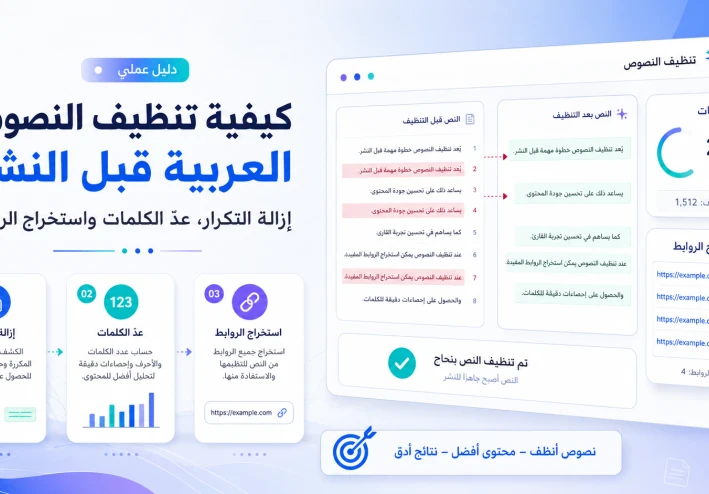
كيفية تنظيف النصوص العربية قبل النشر: إزالة التكرار، عدّ الكلمات واستخراج الروابط
تبدأ جودة أي مقال قبل الضغط على زر النشر بمرحلة يتجاهلها كثير من الكتّاب، وهي تنظيف النصوص العربية من الأخطاء التقنية والتنسيقية. فقد تكون المعلومات مفيدة، لكن وجود أسطر مكررة أو روابط غير واضحة أو مسافات زائدة أو فقرات طويلة يجعل القراءة أصعب ويزيد وقت المراجعة. وتظهر هذه المشكلات عادة عند جمع المعلومات من ملفات متعددة، أو نقل النص من Word وصفحات الويب ورسائل البريد وأدوات الذكاء الاصطناعي.
لا يعني تنظيف النص تغيير أسلوب الكاتب أو حذف التفاصيل المهمة، بل يعني ترتيب المسودة، وإزالة العناصر غير الضرورية، وحساب طول المحتوى، وفحص الروابط قبل النشر. ومن خلال خطوات عملية وأدوات تعمل من المتصفح، يمكن تحويل مسودة مزدحمة إلى مقال منظم وجاهز للقارئ ومحركات البحث.
ما المقصود بتنظيف النصوص العربية؟
تنظيف النص هو مراجعة المسودة لاكتشاف المشكلات التي لا يعالجها التدقيق الإملائي وحده. فالمدقق قد يكتشف كلمة مكتوبة بصورة خاطئة، لكنه لا يخبرك دائمًا بأن فقرة كاملة تكررت مرتين، أو أن النص يحتوي على رابط منسي، أو أن النسخ واللصق أضاف عشرات الأسطر الفارغة.
تشمل عملية التنظيف إزالة التكرار غير المقصود، وتوحيد المسافات، وتنظيم الفقرات، وحذف الرموز الزائدة، وعدّ الكلمات والحروف، واستخراج الروابط لمراجعتها. كما تشمل التأكد من أن العناوين الفرعية تصف محتوى الأقسام بوضوح، وأن كل فقرة تقدم فكرة مفيدة بدل إعادة الكلام نفسه بصياغة مختلفة.
لماذا يجب تنظيف النص قبل النشر؟
النص غير المنظم يرهق القارئ حتى عندما تكون معلوماته صحيحة. فعندما تتكرر الفكرة في أكثر من موضع، يبدو المقال طويلًا دون قيمة إضافية. وعندما تكون الفقرات متصلة وطويلة، تصبح القراءة على الهاتف صعبة. أما الروابط المنسوخة من مصادر مختلفة فقد تقود إلى صفحات محذوفة أو لا ترتبط بموضوع المقال.
يساعد تنظيف النصوص العربية على تحسين قابلية القراءة، وتقليل الأخطاء، وتسريع التحرير، وتجهيز نسخة يمكن نقلها بسهولة إلى ووردبريس أو بلوجر أو أي منصة نشر. ولا تقتصر فائدته على الكتّاب؛ بل يحتاجه الطلاب والباحثون وأصحاب المواقع والمبرمجون عند معالجة القوائم والبيانات النصية.
احتفظ أولًا بنسخة من النص الأصلي
قبل حذف أي سطر أو تعديل أي رابط، احفظ نسخة من المسودة الأصلية في ملف منفصل. فبعض التكرار قد يكون مقصودًا، مثل تكرار اسم منتج داخل جدول أو إعادة مصطلح أساسي في الأسئلة الشائعة.
سمِّ النسخة الأولى «المسودة الأصلية»، ثم أنشئ نسخة ثانية باسم «نسخة المراجعة». ستتمكن بذلك من المقارنة بينهما واستعادة أي فقرة حُذفت بالخطأ. ولا تعتمد على زر التراجع وحده، خصوصًا عند نقل النص بين أكثر من أداة أو محرر.
إزالة الأسطر المتكررة
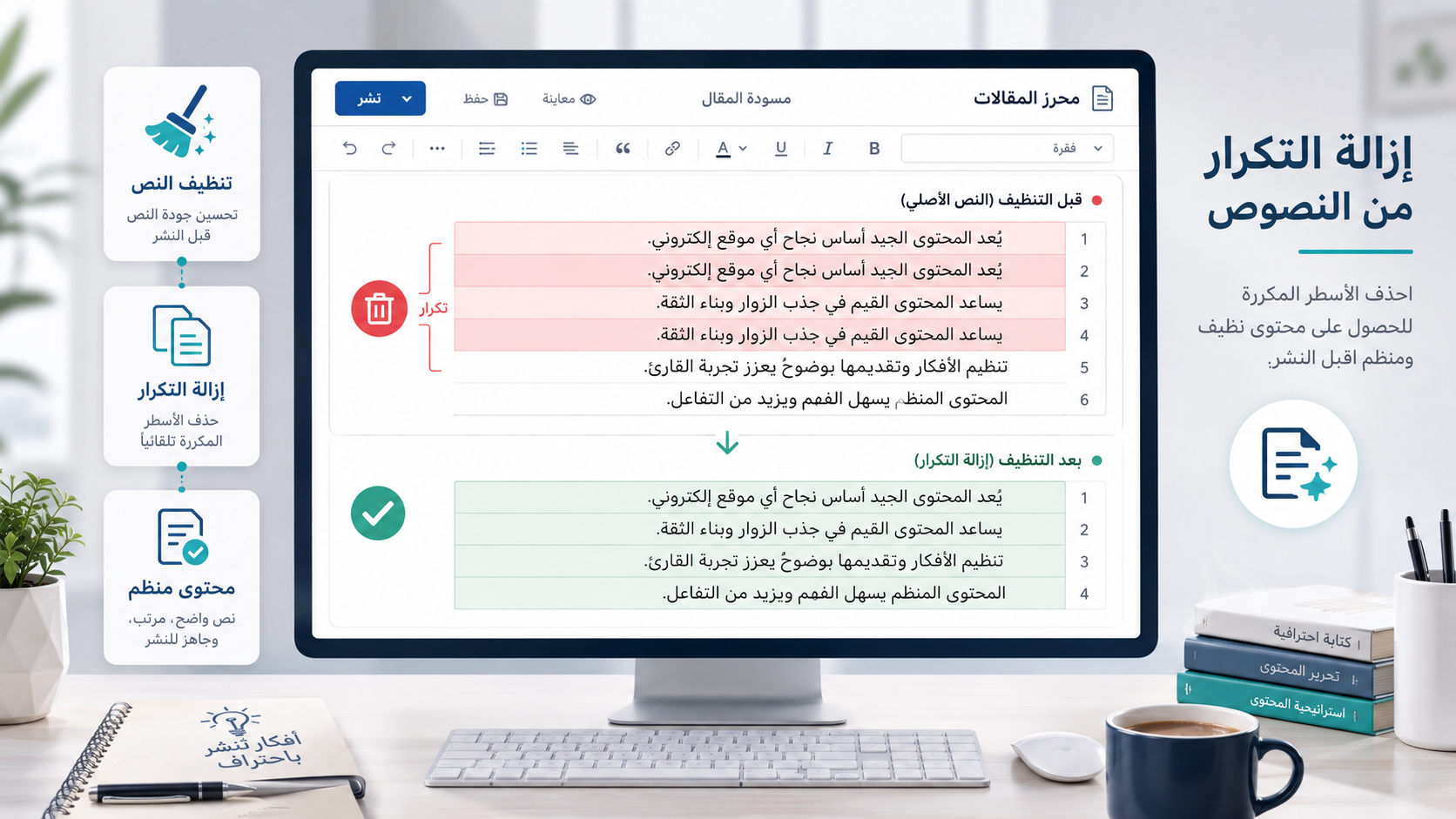
يظهر التكرار غالبًا عند دمج ملاحظات متعددة أو نسخ قوائم من ملفات مختلفة. وقد يكون السطر مكررًا حرفيًا، أو يبدو مختلفًا بسبب مسافة إضافية في بدايته أو نهايته. يمكن اكتشاف ذلك يدويًا في النصوص القصيرة، لكنه يصبح مرهقًا عندما تحتوي المسودة على مئات الأسطر.
يمكن استخدام أداة إزالة الأسطر المتكررة للصق النص، واكتشاف الأسطر الفريدة والمكررة، ثم مراجعة النتيجة قبل نسخها. وتفيد الأداة في تنظيف مسودات المقالات، وقوائم الكلمات المفتاحية، وعناوين المنتجات، والبيانات المستخرجة من ملفات CSV.
بعد إزالة التكرار، اقرأ النص مجددًا. فالأداة تكتشف التطابق بين الأسطر، لكنها لا تعرف دائمًا ما إذا كان التكرار مقصودًا لخدمة المعنى. احتفظ بالجملة عندما تضيف توضيحًا جديدًا، واحذف فقط ما يعيد المعلومة نفسها دون فائدة.
عدّ الكلمات والحروف وتقييم طول الفقرات

عدد الكلمات ليس معيارًا وحيدًا للجودة، لكنه يساعدك على معرفة مدى تغطية الموضوع. فقد يجيب مقال قصير عن سؤال مباشر بصورة ممتازة، بينما يحتاج الدليل العملي إلى مساحة أكبر لشرح الخطوات والأمثلة والمشكلات المحتملة.
باستخدام عداد الكلمات والحروف يمكنك معرفة عدد الكلمات والحروف والجمل والفقرات، إضافة إلى وقت القراءة التقريبي. وتفيد هذه الإحصاءات عند الالتزام بطول محدد للمقال، أو كتابة وصف منتج، أو إعداد محتوى لمنصة تضع حدًا أقصى للأحرف.
لا تراجع الرقم النهائي فقط، بل راقب توزيع الكلمات. فإذا كان المقال 1200 كلمة وإحدى فقراته تتجاوز 200 كلمة متصلة، فمن الأفضل تقسيمها. اجعل لكل فقرة فكرة أساسية، واستخدم عنوانًا فرعيًا عندما تنتقل إلى محور جديد، لأن ذلك يسهل القراءة على شاشات الهاتف.
استخراج الروابط الموجودة داخل النص وHTML

قد تحتوي المسودة المنسوخة من صفحة ويب أو ملف HTML على روابط لا تظهر بوضوح داخل المحرر. كما تتراكم روابط المصادر والصور أثناء البحث، ثم ينسى الكاتب مراجعتها قبل النشر. وقد يؤدي رابط خاطئ أو مكرر إلى تجربة سيئة للزائر.
تساعدك أداة استخراج الروابط من النص وHTML على جمع عناوين URL الموجودة داخل المسودة في قائمة واضحة. بعد استخراجها، افتح الروابط المهمة وتأكد من أنها تعمل، وأنها تقود إلى الصفحة المقصودة، وأن نص الرابط يصف المحتوى الذي سيجده القارئ.
احذف روابط التتبع غير الضرورية، ولا تضف رابطًا لمجرد زيادة عدد الروابط. الرابط الجيد يقدم مصدرًا أو شرحًا أو أداة تنفذ مهمة مفيدة. كما يفضل استخدام نص وصفي مثل «عداد الكلمات والحروف» بدل عبارة عامة مثل «اضغط هنا».
معالجة المسافات وعلامات الترقيم
قد يضيف النسخ من ملفات PDF أو تطبيقات المحادثة مسافات مزدوجة، أو أسطرًا فارغة، أو رموزًا غير مرئية تؤثر في التنسيق. افحص بداية كل فقرة ونهايتها، ووحّد المسافة بعد علامات الترقيم، وتأكد من عدم وجود فراغ قبل الفاصلة أو النقطة.
استخدم الفاصلة العربية «،» داخل النص العربي، وعلامة الاستفهام «؟» عند طرح سؤال. ولا تفرط في علامات التعجب أو النقاط المتتالية، لأنها تقلل مهنية المحتوى. وراجع الأقواس والاقتباسات، خاصة عند إدراج أسماء أدوات أو مصطلحات أجنبية.
تنظيم العناوين والفقرات
بعد تنظيف التكرار والروابط، راجع هيكل المقال. يجب أن يشرح العنوان الرئيسي موضوع الصفحة بوضوح، ثم تقسم العناوين الفرعية المحتوى إلى خطوات منطقية. حاول أن يتمكن القارئ من فهم مسار المقال بمجرد قراءة العناوين.
ابدأ كل قسم بإجابة مباشرة، ثم أضف الشرح والمثال. استخدم قائمة مرقمة للخطوات المتتابعة، وجدولًا بسيطًا للمقارنات. هذا التنظيم يقلل الحشو ويظهر المعلومات المهمة دون إجبار الزائر على قراءة كتل نصية طويلة.
توزيع الكلمات المفتاحية دون حشو
بعد الانتهاء من تنظيف النصوص العربية، راجع الكلمة المفتاحية الأساسية والعبارات المرتبطة بها. من المناسب أن تظهر العبارة الرئيسية في العنوان والمقدمة وأحد العناوين الفرعية والخاتمة، لكن تكرارها في كل فقرة يجعل الأسلوب مصطنعًا.
استخدم مرادفات طبيعية مثل تنسيق النصوص، وتنقية المحتوى، وإزالة التكرار من النص، وعداد الكلمات، ومراجعة الروابط. يساعد هذا التنوع على تغطية أسئلة الباحثين، ويجعل اللغة أكثر سلاسة. الهدف هو تقديم إجابة متكاملة، لا الوصول إلى نسبة ثابتة لكثافة الكلمات المفتاحية.
سير عمل سريع قبل النشر
يمكن تنفيذ المراجعة وفق التسلسل التالي:
حفظ نسخة احتياطية من المسودة.
حذف الأسطر المكررة بعد مراجعتها.
استخدام عداد الكلمات لتقييم طول المقال والفقرات.
استخراج الروابط والتأكد من صلاحيتها.
معالجة المسافات والرموز وعلامات الترقيم.
تنظيم العناوين والقوائم.
قراءة النسخة النهائية على الهاتف قبل النشر.
اقرأ المقال بصوت مسموع إن أمكن؛ فهذه الطريقة تكشف الجمل الطويلة والانتقالات الضعيفة. واسأل عند كل فقرة: هل تقدم معلومة جديدة؟ هل يمكن اختصارها؟ وهل يستطيع القارئ تطبيق الخطوة بسهولة؟ إذا كانت الإجابة نعم، فالمقال أصبح أقرب إلى النشر.
أخطاء شائعة يجب تجنبها
من الأخطاء حذف كل تكرار آليًا دون مراجعة، والتركيز على عدد الكلمات بدل الفائدة، وترك فحص الروابط للحظة الأخيرة. كذلك لا تنقل النص المنظف إلى موقعك دون معاينة؛ فقد تختلف طريقة عرض العناوين والقوائم من محرر إلى آخر.
تجنب أيضًا إدخال بيانات شخصية أو سرية في أي خدمة قبل الاطلاع على سياسة الخصوصية وطريقة المعالجة. وحتى عند استخدام أداة تعمل عبر المتصفح، يجب التأكد من أن النص الذي تشاركه لا يحتوي على كلمات مرور أو معلومات عملاء أو بيانات لا يجوز نشرها.
هل يساعد تنظيف النصوص في تحسين السيو؟
تنظيف النص لا يضمن المركز الأول في Google، لكنه يحسن الوضوح والتنظيم وسهولة القراءة. المقال المرتب يساعد الزائر على الوصول إلى الإجابة بسرعة، ويقلل الفقرات المكررة، ويجعل العناوين والروابط أكثر فائدة. كما تسهل البنية الواضحة على محركات البحث فهم موضوع الصفحة وأقسامها.
الأهم هو تلبية نية الباحث. فإذا كان يريد إزالة التكرار من النص، قدم الخطوات والأداة مباشرة. وإذا كان يبحث عن عداد الكلمات، اشرح ما الذي يحسبه وكيف يستخدم النتيجة. الجمع بين الإجابة والتطبيق العملي أكثر فائدة من تكرار الكلمات المفتاحية دون سياق.
الخلاصة
تنظيف النصوص العربية قبل النشر جزء أساسي من إعداد محتوى واضح وموثوق. ابدأ بإزالة الأسطر المكررة، ثم احسب الكلمات والحروف، واستخرج الروابط، وراجع المسافات وعلامات الترقيم، وأعد تنظيم العناوين والفقرات. بعد ذلك نفذ مراجعة بشرية نهائية حتى تتأكد من سلامة المعنى والأسلوب.
عندما يصبح هذا التسلسل عادة ثابتة، ستقل الأخطاء ويصبح إعداد المقالات والقوائم والبيانات أسرع. ولا تحتاج العملية إلى برامج معقدة؛ يكفي استخدام الأدوات المناسبة من المتصفح، ومراجعة النتائج بعناية، ثم نقل النسخة النهائية إلى منصة النشر.
تابع جديد عصام العماري
اختر إشعارات الموقع أو البريد أو الاثنين. الزائر يقدر يشترك ببريده دون تسجيل حساب.
الإبلاغ عن المقال
لو لاحظت مشكلة في المحتوى، أرسلها لفريق المراجعة. لن تظهر بياناتك لكاتب المقال أو للقراء.
تعذّر إرسال البلاغ الآن. حاول مرة أخرى لاحقًا.
سجّل الدخول لإرسال بلاغ









النقاش
التعليقات (0)
فكرة تضيفها، أو سؤال يفتح حوارًا.
الرجاء تسجيل الدخول لتتمكن من التعليق