

في هذا المقال
Best Free AI Tools in 2026: The Ultimate Guide to Writing, Coding, Design & Productivity
Artificial Intelligence is no longer a futuristic concept—it’s an essential part of how millions of people work, learn, create, and solve problems every day. Whether you’re a student trying to summarize lecture notes, a content creator looking for fresh ideas, a programmer writing code, or a business owner looking to automate repetitive tasks, AI tools can dramatically improve your productivity.
The challenge, however, is not finding an AI tool—it’s choosing the right one.
A quick search for “Best AI Tools” returns hundreds of articles, most of which simply list dozens of applications without explaining who they are actually designed for, what their limitations are, or whether their free plans are genuinely useful.
This guide takes a different approach. Instead of overwhelming you with an endless list of AI applications, we’ve carefully selected the tools that provide real value in 2026. Each recommendation is based on practical usefulness, reliability, continuous development, and the quality of its free plan—not just popularity.
You’ll discover which tools are best for writing, coding, research, image creation, presentations, productivity, design, and much more. More importantly, you’ll learn when to use each tool—and when not to.
By the end of this guide, you’ll be able to choose the AI assistant that best fits your workflow without wasting hours testing dozens of alternatives.
Let’s get started.

How We Selected These AI Tools
With hundreds of AI tools launching every year, creating another generic “Top AI Tools” list would add little value. Our goal was different: to build a practical guide that helps readers choose tools they can actually use—not just read about.
Every AI tool included in this guide was evaluated using a consistent set of criteria to ensure fairness and usefulness.
A Useful Free Plan
Since this guide focuses on free AI tools, every recommendation offers a free plan or a free tier that allows users to experience meaningful functionality before considering a paid subscription.
We also considered the limitations of each free plan, such as usage caps, feature restrictions, and availability.
Real Productivity Benefits
We prioritized tools that solve real-world problems instead of showcasing impressive technology without practical applications.
Each selected tool helps users accomplish tasks such as:
Writing articles and emails
Conducting research
Learning new topics
Creating presentations
Designing graphics
Generating images
Writing or debugging code
Managing projects
Automating repetitive workflows
If a tool didn’t significantly improve productivity, it didn’t make the list.
Reliability and Continuous Development
The AI industry evolves at an incredible pace.
Some applications gain attention for a few months before disappearing, while others receive frequent updates, introduce new capabilities, and continuously improve their models.
For this reason, we prioritized tools backed by established companies or actively maintained development teams with a strong track record of innovation.
Ease of Use
Powerful features mean little if a tool is difficult to understand.
Whether you’re completely new to AI or an experienced professional, every recommendation in this guide offers an intuitive interface and a smooth learning curve.
The best AI tools save time—they shouldn’t require hours of training before becoming useful.
Quality Over Quantity
Many articles claim to list the “50 Best AI Tools.”
In reality, most readers only end up using a handful of them.
Instead of creating an unnecessarily long list, we’ve selected the tools that consistently stand out in their categories based on usefulness, reputation, and overall user experience.
Our goal is simple:
Help you choose the right AI tool—not the longest list of AI tools.
What You’ll Find in This Guide
To make this guide easy to navigate, every AI tool follows the same review format:
Overview — What the tool does.
Best For — Who should use it.
Key Features — The most valuable capabilities.
Free Plan — What you get without paying.
Pros — The biggest strengths.
Cons — The limitations you should know.
Recommendation — Whether it’s the right choice for your specific needs.
This standardized structure allows you to compare different AI tools quickly and confidently.
Whether you’re looking for a writing assistant, a coding companion, a design platform, or an AI-powered research tool, this guide will help you make an informed decision.
Quick Comparison at a Glance
Not sure which AI tool is right for you?
Here’s a quick overview of the best free AI tools in 2026 before we dive into the detailed reviews.
AI Tool
Best For
Free Plan
Difficulty
Overall Rating
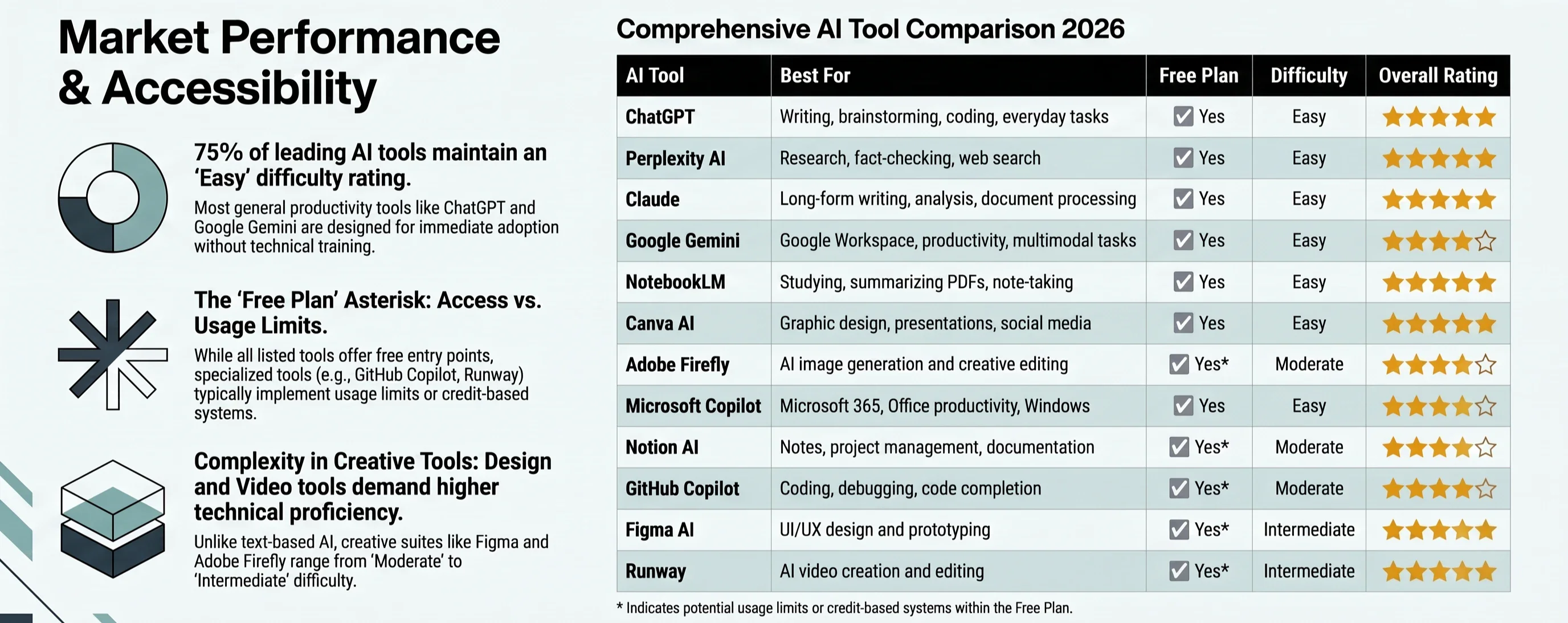
Note: Some tools provide a free plan with usage limits, feature restrictions, or limited AI credits. These limitations are explained in detail in each tool’s review.
Which AI Tool Should You Choose?
If you’re in a hurry, here are our top recommendations based on different needs:
👨🎓 Students → NotebookLM or ChatGPT
✍️ Writers & Bloggers → Claude or ChatGPT
🔍 Researchers → Perplexity AI
💻 Developers → GitHub Copilot or ChatGPT
🎨 Designers → Canva AI or Adobe Firefly
🎬 Video Creators → Runway
📊 Business Professionals → Microsoft Copilot or Notion AI
🌐 Google Ecosystem Users → Google Gemini
💡 Pro Tip
Don’t rely on just one AI tool.
The most productive professionals combine multiple AI assistants depending on the task. For example:
Use Perplexity to gather reliable information.
Refine and expand your ideas with ChatGPT or Claude.
Create visuals using Canva AI or Adobe Firefly.
Organize your projects in Notion AI.
Edit videos with Runway.
By using the right tool for each job, you’ll achieve better results than relying on a single AI assistant for everything.
Now, let’s dive in each tool in detail

ChatGPT
The Most Versatile AI Assistant for Everyday Productivity
Best For: Writing, brainstorming, coding, studying, business tasks, and everyday productivity.
Artificial Intelligence has transformed the way people work, and ChatGPT, developed by OpenAI, remains one of the most influential AI assistants available today. Since its launch, it has become a daily companion for millions of users, helping them write faster, learn new skills, solve technical problems, generate creative ideas, and automate repetitive tasks.
Unlike traditional chatbots that provide short, scripted responses, ChatGPT can understand context, follow complex instructions, and generate natural, human-like conversations across a wide range of subjects.
Whether you're writing a blog post, preparing for an exam, debugging code, planning a marketing campaign, or simply organizing your daily tasks, ChatGPT adapts to different workflows with remarkable flexibility.
Why ChatGPT Stands Out
One of ChatGPT's biggest strengths is its versatility.
Instead of focusing on a single category, it combines multiple capabilities within one interface.
You can use it to:
Write articles, emails, reports, and professional documents.
Brainstorm business ideas and creative projects.
Summarize long articles, PDFs, and research papers.
Explain difficult concepts in simple language.
Generate, review, and debug code in multiple programming languages.
Translate content between many languages.
Create study plans and educational materials.
Assist with travel planning, productivity, and everyday problem-solving.
This wide range of capabilities makes ChatGPT an excellent starting point for both beginners and experienced professionals.
Key Features
Natural and conversational responses.
Strong writing and editing capabilities.
Excellent coding assistance.
Brainstorming and idea generation.
Multilingual support.
File analysis (depending on plan availability).
Image generation and image understanding on supported plans.
Continuous improvements through regular model updates.
Free Plan
OpenAI offers a free plan that allows users to access ChatGPT with certain usage limits.
The exact features and limits may change over time as OpenAI updates its service, but the free tier remains one of the best ways for new users to experience advanced AI capabilities before upgrading to a paid subscription.
Pros
✅ Extremely versatile.
✅ Easy to learn.
✅ Excellent writing quality.
✅ Strong programming assistance.
✅ Supports many professional and academic use cases.
✅ Frequently updated with new capabilities.
Cons
❌ Some advanced features are reserved for paid plans.
❌ Free users may encounter usage limits during periods of high demand.
❌ AI-generated answers should always be verified when accuracy is critical, especially for legal, financial, or medical topics.
Best For
ChatGPT is an excellent choice for:
Students
Bloggers
Copywriters
Software developers
Teachers
Researchers
Entrepreneurs
Freelancers
Marketing professionals
Small business owners
Official Website: https://chatgpt.com
Perplexity AI
The Best AI Search Engine for Accurate Research
Best For: Research, fact-checking, web search, academic learning, and finding reliable information with sources.
Finding accurate information online has become increasingly difficult.
Traditional search engines often return dozens of links, forcing users to open multiple websites before finding a trustworthy answer. Perplexity AI approaches this problem differently by combining conversational AI with real-time web search, allowing users to receive concise answers that are backed by cited sources.
Rather than simply generating text, Perplexity focuses on helping users discover verifiable information quickly, making it especially valuable for students, researchers, journalists, and professionals.
Why Perplexity AI Stands Out
The biggest difference between Perplexity AI and many traditional AI assistants is its emphasis on transparency.
Whenever possible, Perplexity provides links to the sources it used to generate its response. This allows users to verify information, explore original references, and reduce the risk of relying on unsupported AI-generated claims.
This source-based approach makes Perplexity one of the most trusted AI tools for research-oriented tasks.
Key Features
AI-powered web search.
Source citations for many answers.
Fast summaries of recent information.
Follow-up questions within the same conversation.
Research assistance.
Document understanding on supported plans.
Clean and beginner-friendly interface.
Free Plan
Perplexity offers a free plan that includes AI-powered search with access to core features. Some advanced models, premium capabilities, or higher usage limits require a paid subscription.
For most everyday research and information gathering, however, the free version provides significant value.
Pros
✅ Excellent for research.
✅ Provides source citations for many responses.
✅ Fast and intuitive interface.
✅ Ideal for fact-checking.
✅ Helpful for students and professionals.
Cons
❌ Not primarily designed for long-form creative writing.
❌ Advanced AI models and premium features require a subscription.
❌ Users should still evaluate cited sources critically, especially for sensitive or rapidly changing topics.
Best For
Perplexity AI is highly recommended for:
Students
Researchers
Journalists
Content writers
SEO specialists
Business analysts
Professionals who need reliable information quickly
Recommendation
Choose Perplexity AI if your priority is finding trustworthy information efficiently rather than generating long creative conversations.
It complements tools like ChatGPT exceptionally well: use Perplexity to gather reliable information and sources, then use ChatGPT to organize, refine, and transform that information into polished content.
Official Website: https://www.perplexity.ai
Claude
The Best AI Assistant for Long-Form Writing and Deep Analysis
Best For: Long-form writing, document analysis, brainstorming, research assistance, and thoughtful conversations.
When discussing the most capable AI assistants available today, Claude, developed by Anthropic, deserves a place among the very best.
While many AI tools focus on producing quick answers, Claude excels at maintaining context, understanding complex instructions, and generating detailed, well-structured responses. This makes it particularly valuable for users who regularly work with long documents, reports, research papers, and professional writing.
Instead of simply generating text, Claude is designed to reason carefully, making conversations feel more natural and coherent—especially during extended discussions.
Why Claude Stands Out
Every AI assistant has its strengths.
ChatGPT is incredibly versatile.
Perplexity specializes in research.
Claude shines when depth and clarity matter.
Whether you’re writing a detailed report, reviewing lengthy documents, improving business proposals, or brainstorming complex ideas, Claude consistently produces responses that feel organized, thoughtful, and easy to read.
Many professional writers appreciate Claude because it often maintains a more natural writing flow, requiring fewer edits before publication.
Key Features
Exceptional long-form writing capabilities.
Strong reasoning and analytical responses.
Excellent document summarization.
Handles lengthy conversations while maintaining context.
Natural and professional writing style.
Supports brainstorming and creative collaboration.
Regular model improvements from Anthropic.
Free Plan
Claude offers a free plan that allows users to experience its core conversational AI capabilities, although usage limits apply and availability may vary depending on demand and region.
Users who require higher limits or access to the latest premium models may consider a paid subscription.
Pros
✅ Outstanding writing quality.
✅ Excellent for analyzing long documents.
✅ Thoughtful and well-structured responses.
✅ Strong contextual understanding.
✅ Beginner-friendly interface.
Cons
❌ Usage limits on the free plan.
❌ Some advanced capabilities require a paid subscription.
❌ Availability and features may differ by country or region.
Best For
Claude is an excellent choice for:
Writers
Bloggers
Researchers
University students
Business professionals
Editors
Content strategists
Consultants
Recommendation
Choose Claude if your work involves extensive reading, detailed writing, or document analysis.
Its ability to understand context over long conversations makes it one of the strongest AI assistants for professionals who value clarity, structure, and high-quality written content.
Official Website: https://claude.ai
Google Gemini
The Best AI Assistant for Google Workspace Users
Best For: Google Search, Gmail, Google Docs, Google Drive, productivity, and everyday AI assistance.
Google has spent decades building one of the world's largest ecosystems of digital services. With Gemini, the company brings artificial intelligence directly into that ecosystem, allowing users to work more efficiently across familiar Google products.
Whether you're drafting emails in Gmail, organizing documents in Google Docs, searching for information, or collaborating through Google Workspace, Gemini is designed to streamline everyday tasks without requiring users to leave the Google environment.
For people who already rely on Google's services, Gemini offers a convenient and highly integrated AI experience.
Why Gemini Stands Out
Unlike many standalone AI assistants, Gemini is deeply connected to Google's ecosystem.
Instead of switching between multiple applications, users can access AI-powered assistance while working inside services they already use daily.
This tight integration can significantly improve productivity by reducing repetitive tasks such as drafting emails, summarizing documents, organizing information, and generating ideas.
Gemini also supports multimodal interactions, allowing users to work with text, images, and other types of information depending on the available features and plan.
Key Features
Seamless integration with Google Workspace.
AI assistance for Gmail and Google Docs.
Strong multimodal capabilities.
Image understanding and analysis.
Helpful brainstorming and writing assistance.
Access across multiple Google services.
Continuous improvements through Google's AI models.
Free Plan
Google offers a free version of Gemini with access to core AI capabilities. More advanced models, premium integrations, and additional features are available through paid plans.
The exact feature set may change as Google continues to expand its AI offerings.
Pros
✅ Excellent integration with Google services.
✅ Easy to use for existing Google users.
✅ Helpful for productivity and collaboration.
✅ Strong multimodal capabilities.
✅ Regular updates from Google.
Cons
❌ Some advanced features require premium subscriptions.
❌ The experience is most beneficial for users already invested in the Google ecosystem.
❌ Feature availability may vary depending on location and account type.
Best For
Gemini is highly recommended for:
Students
Office workers
Google Workspace users
Teachers
Project managers
Small business owners
Content creators
Everyday productivity users
Recommendation
Choose Gemini if most of your work happens within Google's ecosystem.
Its seamless integration with Gmail, Google Docs, Drive, and other Google services makes it an excellent productivity companion for users who want AI assistance without changing the way they already work.
Official Website: https://gemini.google.com
💡 Expert Tip
At this point, many readers ask:
"Which one is actually better: ChatGPT, Claude, or Gemini?"
The honest answer is that there is no universal winner—each excels in different scenarios.
ChatGPT is the most versatile all-around assistant, suitable for writing, coding, brainstorming, and everyday productivity.
Claude stands out for long-form writing, document analysis, and maintaining context in complex discussions.
Gemini is the strongest choice for users who spend most of their time in Google's ecosystem, thanks to its tight integration with Google Workspace.
Rather than replacing one another, these tools often complement each other. The most productive users choose the assistant that best matches the task at hand.

NotebookLM
The Ultimate AI Research Assistant for Students and Professionals
Best For: Studying, research, note-taking, document analysis, PDF summarization, and learning from your own sources.
If you’ve ever wished for an AI assistant that truly understands your documents instead of relying solely on general internet knowledge, NotebookLM is one of the most impressive AI tools available today.
Developed by Google, NotebookLM takes a unique approach to artificial intelligence. Instead of asking questions based only on a general AI model, you can upload your own materials—such as PDFs, lecture notes, reports, books, research papers, or meeting documents—and ask questions directly about them.
This makes NotebookLM feel less like a chatbot and more like a personal research assistant that works exclusively with your information.
Why NotebookLM Stands Out
Most AI assistants are designed to answer general questions.
NotebookLM is different.
It allows users to build an AI workspace around their own documents, making it ideal for anyone who regularly studies large amounts of information or works with complex files.
Imagine preparing for an exam with hundreds of pages of lecture notes.
Instead of manually searching through every page, you can ask:
What are the key concepts in Chapter 5?
Summarize this report in five bullet points.
Explain this paragraph in simpler language.
Compare the conclusions of these two research papers.
NotebookLM analyzes the uploaded materials and generates answers based on your own sources, helping reduce research time significantly.
Key Features
Upload and analyze PDFs, documents, and notes.
AI-powered summaries of lengthy materials.
Ask questions about your own files.
Organize multiple sources into a single workspace.
Generate study guides and revision notes.
Simplify technical or academic content.
Helps users understand complex information faster.
Free Plan
NotebookLM offers a free version that provides access to its core document-based AI capabilities. Google may adjust usage limits or available features over time, but the free plan remains an excellent starting point for students and professionals who want to explore AI-assisted research.
Pros
✅ Excellent for studying and academic research.
✅ Saves hours when reviewing large documents.
✅ Easy-to-use interface.
✅ Generates accurate summaries based on uploaded materials.
✅ Works particularly well with PDFs and lecture notes.
Cons
❌ Designed primarily for document-based workflows rather than creative writing.
❌ The quality of answers depends on the quality of the uploaded sources.
❌ Some advanced capabilities may require a Google account or be subject to usage limitations.
Best For
NotebookLM is highly recommended for:
University students
Researchers
Teachers
Professors
Medical students
Lawyers
Business analysts
Anyone working with large collections of documents
Recommendation
Choose NotebookLM if your daily work revolves around reading, studying, or analyzing documents.
Instead of replacing search engines or traditional AI assistants, NotebookLM complements them by transforming your own files into an interactive knowledge base. For students, researchers, and professionals, it can dramatically reduce the time spent reviewing complex materials.
Official Website: https://notebooklm.google.com
Canva AI
The Best AI Design Platform for Beginners and Content Creators
Best For: Graphic design, presentations, social media content, marketing materials, and visual content creation.
Professional-looking designs no longer require years of experience with complex design software.
With Canva AI, anyone can create polished graphics, presentations, social media posts, videos, and marketing materials in minutes—even without prior design knowledge.
By combining Canva’s intuitive drag-and-drop editor with AI-powered features, the platform has become one of the most popular creative tools for students, entrepreneurs, marketers, and content creators worldwide.
Whether you’re designing an Instagram post, preparing a business presentation, or creating promotional materials for your brand, Canva AI helps turn ideas into visually appealing content with minimal effort.
Why Canva AI Stands Out
Unlike traditional design software that often requires advanced technical skills, Canva focuses on simplicity and speed.
Its AI features can help users generate images, write text, suggest layouts, remove backgrounds, resize designs for different platforms, and even create presentations from simple prompts.
Instead of starting with a blank canvas, users can begin with AI-generated suggestions and customize them according to their needs.
This significantly shortens the design process while maintaining professional-quality results.
Key Features
AI-assisted graphic design.
Presentation generation.
AI writing assistance.
Image generation and editing.
Background removal (availability depends on plan).
Thousands of customizable templates.
Social media content creation.
Brand kit and collaboration features.
Easy drag-and-drop interface.
Free Plan
Canva offers a generous free plan that includes thousands of templates, design assets, and several AI-powered features. However, some premium templates, advanced AI tools, and collaboration features are reserved for Canva Pro subscribers.
For most casual users and many content creators, the free version provides enough functionality to create high-quality visual content.
Pros
✅ Extremely beginner-friendly.
✅ Professional-quality templates.
✅ Excellent for social media.
✅ Saves significant design time.
✅ Supports teamwork and collaboration.
✅ Works directly in a web browser without complicated installation.
Cons
❌ Some of the most advanced AI features require Canva Pro.
❌ Certain premium templates and design elements are not available in the free plan.
❌ Professional designers may still prefer specialized software for highly complex projects.
Best For
Canva AI is an excellent choice for:
Content creators
Social media managers
Small business owners
Bloggers
Teachers
Students
Marketing professionals
Freelancers
Entrepreneurs
Recommendation
Choose Canva AI if you want to create professional visuals quickly without mastering traditional design software.
Its combination of simplicity, AI-powered creativity, and an extensive template library makes it one of the best all-in-one design platforms for both beginners and experienced creators.
Official Website: https://www.canva.com
💡 Expert Insight
Many beginners assume that ChatGPT and Canva AI compete with each other—but they actually work best together.
A highly efficient workflow looks like this:
Use ChatGPT to brainstorm ideas, write headlines, captions, blog outlines, or presentation scripts.
Use Canva AI to transform that content into visually engaging graphics, presentations, infographics, or social media posts.
Review and customize the final design to match your personal or brand style.
By combining writing-focused AI with design-focused AI, you can create professional-quality content much faster than relying on either tool alone.
Adobe Firefly
The Best AI Tool for Professional Image Generation and Creative Editing
Best For: AI image generation, photo editing, graphic design, commercial creative work, and Adobe Creative Cloud users.
Artificial intelligence has changed the creative industry dramatically, and Adobe Firefly is one of the strongest examples of how AI can enhance—not replace—human creativity.
Developed by Adobe, Firefly is designed to help users generate high-quality images, create artistic effects, edit photos, and automate time-consuming design tasks using simple text prompts.
Unlike many AI image generators, Adobe has focused on making Firefly suitable for professional and commercial use by integrating it with popular Adobe applications such as Photoshop, Illustrator, and Adobe Express.
For designers, marketers, photographers, and content creators, this integration creates a seamless workflow between AI-generated content and traditional editing tools.
Why Adobe Firefly Stands Out
Many AI image generators can produce impressive artwork, but Adobe Firefly goes a step further by fitting naturally into professional creative workflows.
Instead of forcing users to leave their favorite design software, Firefly brings AI-powered features directly into Adobe’s creative ecosystem.
Users can quickly generate new images, expand existing ones, remove distracting objects, replace backgrounds, recolor vector artwork, and experiment with multiple design ideas in a fraction of the usual time.
Because Adobe has emphasized responsible AI development and licensing, Firefly has become an attractive choice for professionals who create commercial content.
Key Features
AI image generation from text prompts.
Generative Fill for adding or removing objects.
Generative Expand for extending images beyond their original dimensions.
AI-powered background replacement.
Text effects and creative typography.
Vector recoloring for Adobe Illustrator.
Integration with Photoshop, Illustrator, and Adobe Express.
Commercial-friendly creative workflow.
Free Plan
Adobe Firefly offers a free plan that includes a limited number of monthly generative credits. These credits allow users to explore many of Firefly’s AI features before deciding whether they need a paid Creative Cloud subscription.
Users who create AI-generated content frequently may benefit from Adobe’s premium plans, which provide additional credits and expanded capabilities.
Pros
✅ Professional-quality image generation.
✅ Excellent integration with Adobe Creative Cloud.
✅ Powerful AI editing tools.
✅ Suitable for commercial creative projects.
✅ Beginner-friendly while still offering advanced capabilities.
Cons
❌ Monthly AI credits are limited on the free plan.
❌ Some advanced features require a Creative Cloud subscription.
❌ Works best for users already familiar with Adobe’s ecosystem.
Best For
Adobe Firefly is highly recommended for:
Graphic designers
Photographers
Digital artists
Marketing teams
Branding specialists
Social media creators
Advertising agencies
Creative professionals
Recommendation
Choose Adobe Firefly if you want professional-grade AI image generation combined with powerful editing capabilities.
Its seamless integration with Adobe’s creative tools makes it one of the best AI platforms for users who produce visual content professionally or want commercial-ready creative assets.
Official Website: https://firefly.adobe.com
Microsoft Copilot
The Best AI Assistant for Microsoft 365 and Workplace Productivity
Best For: Office productivity, document creation, email management, spreadsheets, presentations, coding assistance, and Windows users.
Modern workplaces demand speed, organization, and efficiency—and Microsoft Copilot is designed to deliver exactly that.
Built on advanced AI technology and deeply integrated with Microsoft’s ecosystem, Copilot helps users complete everyday tasks more efficiently across Microsoft 365 applications, Windows, and the Edge browser.
Whether you’re drafting business emails, analyzing Excel data, creating PowerPoint presentations, summarizing long Word documents, or managing meetings, Copilot can significantly reduce repetitive work and improve overall productivity.
For professionals who already rely on Microsoft products every day, it feels like having a personal assistant built directly into the software they use most.
Why Microsoft Copilot Stands Out
Unlike standalone AI assistants, Microsoft Copilot focuses on improving the applications millions of people already use in their daily work.
Instead of switching between different websites or AI platforms, users can receive intelligent assistance while writing documents, preparing presentations, analyzing spreadsheets, or responding to emails.
This seamless integration helps save time, reduce manual effort, and streamline complex workflows.
Copilot also supports contextual assistance, meaning it can understand the content of your current document or project and provide relevant suggestions based on that context.
Key Features
AI assistance inside Microsoft Word.
Email drafting and summarization in Outlook.
Spreadsheet analysis in Excel.
Presentation creation in PowerPoint.
Windows AI assistant.
AI-powered web assistance in Microsoft Edge.
Document summarization.
Meeting summaries and productivity support (depending on subscription and service).
Free Plan
Microsoft provides a free version of Copilot with core AI chat capabilities available through supported Microsoft services. However, advanced Microsoft 365 integrations, enterprise features, and expanded productivity tools generally require eligible Microsoft subscriptions.
The available features may vary depending on your Microsoft account, region, and subscription plan.
Pros
✅ Excellent integration with Microsoft 365.
✅ Saves time on repetitive office tasks.
✅ Helpful for business communication.
✅ Strong productivity features.
✅ Familiar interface for Microsoft users.
Cons
❌ Many advanced workplace features require Microsoft 365 subscriptions.
❌ Best experience is achieved within Microsoft’s ecosystem.
❌ Some enterprise capabilities are unavailable to free users.
Best For
Microsoft Copilot is an excellent choice for:
Office professionals
Business managers
Project managers
Corporate employees
Students
Teachers
Data analysts
Administrative assistants
Windows users
Recommendation
Choose Microsoft Copilot if most of your work happens in Microsoft Word, Excel, Outlook, PowerPoint, or Windows.
Its deep integration with Microsoft’s productivity suite makes it one of the most effective AI assistants for professionals who want to automate routine tasks and work more efficiently without leaving their existing workflow.
Official Website: https://copilot.microsoft.com
💡 Expert Insight
Many users compare Adobe Firefly and Microsoft Copilot, but they solve completely different problems.
Adobe Firefly is built for creative professionals, helping users generate images, edit visuals, and accelerate graphic design workflows.
Microsoft Copilot is designed for knowledge workers and office professionals, streamlining document creation, email management, spreadsheets, and presentations.
If your work revolves around visual creativity, Firefly is the stronger choice. If your daily tasks involve documents, meetings, and productivity, Microsoft Copilot will likely deliver greater value.

Notion AI
The Best AI Workspace for Notes, Project Management, and Team Collaboration
Best For: Note-taking, project management, knowledge organization, documentation, content planning, and team collaboration.
Staying organized has become more challenging than ever, especially when managing multiple projects, deadlines, and ideas. Notion AI enhances the popular Notion workspace by integrating artificial intelligence directly into your notes, documents, and project management system.
Instead of switching between separate apps for writing, brainstorming, summarizing, and organizing information, users can complete all these tasks within a single workspace. This seamless experience makes Notion AI an excellent choice for individuals and teams looking to improve productivity while keeping everything organized.
Whether you’re planning a marketing campaign, documenting software projects, managing class notes, or creating editorial calendars, Notion AI helps reduce repetitive work and keeps your information structured.
Why Notion AI Stands Out
Many AI assistants focus on answering questions or generating content, but Notion AI is designed to work inside your existing workflow.
Because it understands the context of your notes and projects, it can help users write faster, summarize long documents, generate meeting notes, create task lists, and improve existing content without leaving the workspace.
Its greatest advantage is that your ideas, documents, databases, and AI assistance all live in one place, making it easier to manage both personal and professional projects.
Key Features
AI-powered writing assistance.
Automatic summaries for long notes and documents.
Brainstorming and idea generation.
Task list creation and project planning.
Meeting note generation.
Content rewriting and editing.
Integration with Notion pages and databases.
Collaborative workspace for teams.
Free Plan
Notion offers a free workspace for individuals, while access to Notion AI may include limited complimentary usage or require an AI add-on depending on the current subscription model and account type.
Because Notion occasionally updates its pricing and AI offerings, users should check the official website for the latest availability and plan details.
Pros
✅ Excellent all-in-one productivity platform.
✅ Keeps notes, projects, and AI assistance together.
✅ Saves time when writing and organizing information.
✅ Great collaboration features for teams.
✅ Clean and intuitive interface.
Cons
❌ Some AI features require a paid subscription or AI add-on.
❌ Works best if you’re already using Notion regularly.
❌ Large workspaces may require some initial setup to maximize efficiency.
Best For
Notion AI is highly recommended for:
Students
Project managers
Content creators
Bloggers
Startup founders
Marketing teams
Product managers
Freelancers
Remote teams
Recommendation
Choose Notion AI if you want an intelligent workspace that combines note-taking, project management, and AI-powered writing in one platform.
Instead of juggling multiple productivity apps, Notion AI helps centralize your work, making it easier to plan, organize, and execute projects efficiently.
Official Website: https://www.notion.so/product/ai
GitHub Copilot
The Best AI Coding Assistant for Developers
Best For: Code completion, software development, debugging, learning programming, and improving developer productivity.
Writing software often involves repetitive coding, searching documentation, and solving common programming problems. GitHub Copilot, developed through a collaboration between GitHub and OpenAI, is designed to make that process significantly faster and more efficient.
Rather than replacing developers, GitHub Copilot acts as an AI coding partner. It analyzes the context of your project and suggests code, functions, comments, tests, and even complete implementations while you work inside your code editor.
This allows developers to spend less time on repetitive tasks and more time focusing on solving real problems.
Why GitHub Copilot Stands Out
Unlike general-purpose AI assistants, GitHub Copilot is built specifically for software development.
It integrates directly into popular development environments such as Visual Studio Code, allowing developers to receive intelligent code suggestions without leaving their editor.
Whether you’re creating a web application, debugging existing code, writing unit tests, or learning a new programming language, Copilot provides context-aware assistance that can significantly accelerate development.
While it doesn’t replace programming knowledge, it serves as a valuable productivity tool for developers at almost every experience level.
Key Features
Intelligent code completion.
Function and class generation.
Automatic documentation suggestions.
Unit test generation.
Debugging assistance.
Support for multiple programming languages.
Integration with Visual Studio Code and other supported IDEs.
Context-aware coding suggestions.
Free Plan
GitHub Copilot offers a free plan for eligible users, including verified students, teachers, and maintainers of popular open-source projects. For other users, GitHub also provides trial options, while full access typically requires a paid subscription.
Eligibility and available plans may change over time, so it’s advisable to check GitHub’s official website for the latest details.
Pros
✅ Increases developer productivity.
✅ Excellent code completion.
✅ Supports many programming languages.
✅ Helps reduce repetitive coding tasks.
✅ Useful for learning unfamiliar frameworks and APIs.
Cons
❌ Not a substitute for understanding programming fundamentals.
❌ AI-generated code should always be reviewed and tested.
❌ Full access generally requires a subscription for most professional users.
Best For
GitHub Copilot is highly recommended for:
Software developers
Computer science students
Web developers
Mobile app developers
Data scientists
DevOps engineers
Open-source contributors
Programming learners
Recommendation
Choose GitHub Copilot if programming is a significant part of your daily work.
By automating repetitive coding tasks and providing intelligent suggestions directly within your development environment, GitHub Copilot can help you write code faster, reduce routine work, and improve overall productivity—while still requiring human review and expertise.
Official Website: https://github.com/features/copilot
💡 Expert Insight
Although Notion AI and GitHub Copilot are both AI-powered productivity tools, they serve entirely different purposes.
Notion AI helps organize ideas, manage projects, summarize documents, and improve written content, making it ideal for knowledge workers and collaborative teams.
GitHub Copilot focuses on software development, assisting programmers with code generation, debugging, documentation, and repetitive programming tasks.
Many professionals actually benefit from using both together. For example, a software engineer can use Notion AI to plan project requirements and document architecture, then switch to GitHub Copilot to accelerate the coding process. This combination creates a more efficient end-to-end workflow for modern development teams.
Figma AI
The Best AI Design Assistant for UI/UX Designers and Product Teams
Best For: UI/UX design, wireframing, interface prototyping, brainstorming design ideas, and collaborative product design.
Designing modern digital products requires much more than creativity—it demands speed, consistency, and seamless collaboration. Figma AI enhances the popular Figma design platform by introducing artificial intelligence into the design workflow, allowing designers to move from ideas to polished interfaces more efficiently.
Whether you’re designing a mobile application, a website, or a complete product interface, Figma AI helps automate repetitive tasks and accelerate the early stages of the design process.
Instead of spending hours creating basic layouts from scratch, designers can focus on refining user experiences and making better design decisions.
Why Figma AI Stands Out
Figma has long been one of the industry’s leading collaborative design platforms.
With the addition of AI-powered features, it becomes even more powerful by helping designers generate interface layouts, organize design systems, rename layers intelligently, create placeholder content, and simplify repetitive work.
Because Figma is already widely used by startups, agencies, and enterprise product teams, these AI enhancements fit naturally into existing workflows rather than requiring designers to learn an entirely new platform.
Key Features
AI-assisted interface generation.
Smart layout suggestions.
Automatic content generation.
Layer organization and renaming.
Design brainstorming assistance.
Rapid wireframe creation.
Team collaboration.
Seamless integration with existing Figma projects.
Free Plan
Figma offers a free plan suitable for individuals and small teams. Some AI-powered features, advanced collaboration tools, or enterprise capabilities may require a paid Professional or Organization plan.
Google-like simplicity combined with collaborative editing makes the free version an excellent starting point for aspiring designers.
Pros
✅ Excellent collaboration features.
✅ Speeds up UI/UX workflows.
✅ Beginner-friendly interface.
✅ Ideal for modern product teams.
✅ Integrates AI into an already popular platform.
Cons
❌ Some AI capabilities require premium plans.
❌ Primarily focused on interface and product design rather than general graphic design.
❌ Advanced design knowledge is still valuable for producing high-quality results.
Best For
Figma AI is highly recommended for:
UI designers
UX designers
Product designers
Web designers
Startup founders
Product managers
Design agencies
Front-end developers
Recommendation
Choose Figma AI if you design digital products and want to speed up your workflow without sacrificing collaboration or design quality.
Its AI-powered features reduce repetitive work while allowing designers to spend more time improving usability and creating better user experiences.
Official Website: https://www.figma.com
Runway
The Best AI Video Generator for Content Creators
Best For: AI video generation, video editing, filmmaking, visual storytelling, marketing videos, and social media content.
Video has become one of the most effective forms of online communication, but producing high-quality videos traditionally requires advanced editing skills and significant time.
Runway changes that by combining powerful AI models with an intuitive editing platform that helps creators produce professional-looking videos more efficiently.
From generating videos with text prompts to removing backgrounds, tracking objects, editing footage, and creating cinematic effects, Runway brings advanced AI capabilities to filmmakers, marketers, educators, and content creators.
Its growing collection of AI-powered creative tools has made it one of the most talked-about platforms in the AI video industry.
Why Runway Stands Out
While many AI platforms focus only on images or text, Runway specializes in video production.
Its AI tools help users automate complex editing tasks that once required expensive software and years of experience.
Creators can generate visual content from prompts, edit existing footage, remove unwanted objects, enhance clips, and experiment with new storytelling techniques—all within a single platform.
This combination of accessibility and professional-quality output has made Runway a favorite among digital creators and creative teams.
Key Features
AI video generation.
AI-powered video editing.
Background removal.
Object removal and replacement.
Motion tracking.
Image-to-video capabilities.
Creative visual effects.
Browser-based editing platform.
Free Plan
Runway provides a free plan that allows users to explore many of its AI-powered video tools. However, free accounts typically include limited credits, export restrictions, or feature limitations compared to premium subscriptions.
For casual creators and learners, the free plan is a great way to experiment before upgrading.
Pros
✅ Excellent AI video generation.
✅ Powerful editing tools.
✅ Beginner-friendly interface.
✅ Frequently updated with new AI features.
✅ Ideal for social media and creative projects.
Cons
❌ Limited AI credits on the free plan.
❌ Premium exports and advanced features require paid subscriptions.
❌ Complex projects may still require traditional video editing knowledge.
Best For
Runway is highly recommended for:
YouTubers
Video editors
Filmmakers
Marketing teams
Social media creators
Advertising agencies
Educators
Creative professionals
Recommendation
Choose Runway if video content is an important part of your workflow.
Its combination of AI-powered generation, editing, and creative effects makes it one of the strongest platforms for producing professional-quality videos without requiring years of editing experience.
Official Website: https://runwayml.com
🌟 Honorable Mentions
Although the following tools did not make our primary list, they are still worth exploring depending on your needs:
Grammarly AI
A powerful writing assistant that helps improve grammar, clarity, tone, and readability. It is especially useful for students, professionals, and anyone writing emails, reports, or articles in English.
Best for: Writing improvement and proofreading.
ElevenLabs
One of the leading AI voice generation platforms, capable of producing realistic text-to-speech audio in multiple languages with natural-sounding voices.
Best for: Voiceovers, audiobooks, podcasts, and video narration.
Midjourney
An AI image generator known for creating highly artistic and visually stunning images. It is widely used by digital artists, concept designers, and creative professionals.
Best for: Artistic image generation and concept art.
Gamma
An AI-powered presentation platform that transforms prompts into polished presentations, documents, and webpages with minimal effort.
Best for: Business presentations, educational content, and quick visual documents.
Cursor
A modern AI-powered code editor designed specifically for developers. It integrates advanced AI coding assistance directly into the editing experience.
Best for: Professional software development and AI-assisted coding.
Leonardo AI
A creative AI image generation platform offering fine control over styles, models, and visual outputs, making it popular among game developers and designers.
Best for: Game assets, illustrations, and commercial artwork.
DeepL
An AI translation platform recognized for producing highly accurate and natural translations across many languages.
Best for: Professional translation and multilingual communication.
Zapier AI
A workflow automation platform that combines AI with thousands of app integrations, allowing users to automate repetitive business processes without coding.
Best for: Business automation and productivity.
💡 Final Expert Insight
No single AI tool is perfect for every situation.
The most productive professionals don’t rely on one assistant—they build an AI toolkit, choosing the best solution for each task:
ChatGPT for everyday productivity and content creation.
Perplexity AI for research and source-backed answers.
Claude for long-form writing and document analysis.
Google Gemini for users invested in the Google ecosystem.
NotebookLM for studying and document-based learning.
Canva AI for graphic design and presentations.
Adobe Firefly for professional image generation and editing.
Microsoft Copilot for Microsoft 365 productivity.
Notion AI for project management and knowledge organization.
GitHub Copilot for software development.
Figma AI for UI/UX design.
Runway for AI-powered video creation.
The best strategy is not to find one AI tool that does everything—but to combine several specialized tools into a workflow that matches your personal or professional needs.
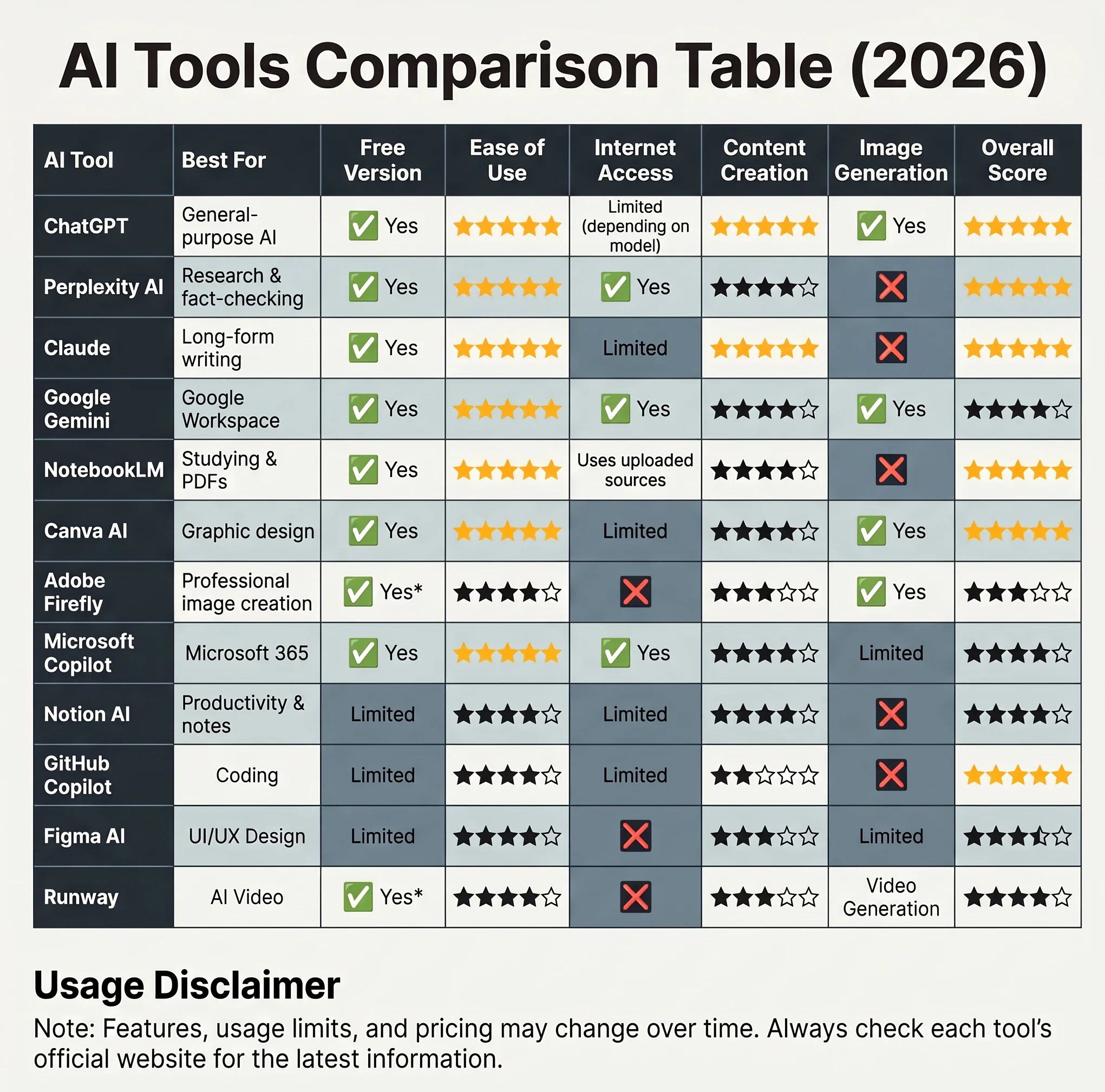
AI tools Comparison Table
Now that we’ve explored the best free AI tools of 2026 in detail, here’s a comprehensive comparison to help you quickly choose the right one for your specific needs.
AI Tool
Best For
Free Version
Ease of Use
Internet Access
Content Creation
Image Generation
Overall Score
Which AI Tool Is Best for You?
Choosing the "best" AI tool depends entirely on your goals. Here are our recommendations based on different user types.
🎓 Students
Recommended Tools
ChatGPT
NotebookLM
Perplexity AI
These tools are excellent for studying, summarizing lecture notes, understanding difficult concepts, and conducting research more efficiently.
✍️ Writers & Bloggers
Recommended Tools
ChatGPT
Claude
Grammarly AI
If your work involves writing articles, books, newsletters, or marketing content, these tools can significantly improve both productivity and writing quality.
💻 Developers
Recommended Tools
GitHub Copilot
ChatGPT
Cursor
Developers can accelerate coding, debugging, documentation, and learning new technologies by combining these AI assistants.
🎨 Designers
Recommended Tools
Canva AI
Adobe Firefly
Figma AI
Together, these platforms cover everything from social media graphics to professional interface design and creative image generation.
🎬 Video Creators
Recommended Tools
Runway
Canva AI
ElevenLabs
This combination simplifies scripting, editing, voice generation, and AI-powered video production.
📊 Business Professionals
Recommended Tools
Microsoft Copilot
Notion AI
ChatGPT
These tools help automate documentation, meetings, presentations, project management, and daily administrative work.
🔬 Researchers
Recommended Tools
Perplexity AI
NotebookLM
Claude
Researchers benefit from source-backed search, document analysis, and high-quality long-form explanations.
Common Mistakes When Choosing an AI Tool
Many beginners make the same mistakes when starting with AI. Avoiding these common pitfalls will save you time and improve your results.
1. Looking for One Tool That Does Everything
No AI assistant excels at every task.
Instead, choose specialized tools for different workflows.
2. Trusting AI Without Verification
AI systems can occasionally generate inaccurate or outdated information.
Always verify important facts—especially in medical, legal, financial, or academic contexts.
3. Ignoring the Free Version
Many users immediately purchase subscriptions before exploring the free plans.
In reality, most people can accomplish a large portion of their work using free features alone.
4. Choosing the Most Popular Tool Instead of the Right Tool
Popularity doesn't always equal suitability.
The best AI assistant is the one that aligns with your specific workflow and goals.
5. Not Learning Prompt Engineering
The quality of AI-generated results depends heavily on the quality of your prompts.
Learning how to communicate clearly with AI can dramatically improve the usefulness of every tool discussed in this article.
Frequently Asked Questions (FAQ)
Which is the best free AI tool in 2026?
For most users, ChatGPT remains the most versatile option because it supports writing, brainstorming, coding, learning, and everyday productivity. However, the ideal choice depends on your specific needs.
Which AI tool is best for students?
NotebookLM, ChatGPT, and Perplexity AI are among the strongest options for studying, summarizing documents, conducting research, and preparing for exams.
Which AI tool is best for content creators?
Content creators often achieve the best results by combining ChatGPT for writing, Canva AI for design, and Runway for video production.
Which AI tool is best for programmers?
GitHub Copilot is specifically designed for software development, while ChatGPT is also highly effective for explaining code, debugging, and learning new programming concepts.
Which AI tool is best for research?
Perplexity AI is particularly valuable for research because it often provides source citations, while NotebookLM excels at analyzing your own documents and study materials.
Are free AI tools good enough?
Yes. Many free AI tools provide excellent functionality for students, freelancers, and casual users. Paid plans typically offer higher usage limits, faster performance, and access to advanced features rather than fundamentally different experiences.
Can I use multiple AI tools together?
Absolutely. In fact, combining specialized AI tools often produces better results than relying on a single assistant for every task.

Conclusion: Which Free AI Tool Should You Choose?
Artificial intelligence is evolving faster than ever, and choosing the right tool can significantly improve the way you work, learn, create, and solve problems.
Rather than searching for a single "perfect" AI assistant, consider building a workflow that combines the strengths of several specialized tools. For example, you might use Perplexity AI to gather reliable information, ChatGPT or Claude to refine and organize your ideas, Canva AI or Adobe Firefly to create visuals, and Runway to produce engaging videos.
The good news is that every tool featured in this guide offers a free way to get started, making it easy to experiment before deciding whether a premium subscription is worthwhile.
As AI technology continues to evolve throughout 2026 and beyond, staying informed about new features and updates will help you make smarter decisions and remain productive in an increasingly AI-powered world.
If you're just getting started, begin with one or two tools that match your daily needs, master them, and gradually expand your AI toolkit as your experience grows.








النقاش
التعليقات (0)
فكرة تضيفها، أو سؤال يفتح حوارًا.
الرجاء تسجيل الدخول لتتمكن من التعليق